
live() & delegate() functions of jQuery

live() & delegate() are two unique functions of jQuery. These two function look & act much like bind() function of jQuery. However they have a very different purpose.

We know that bind() function is used to binds Event Handlers to the elements matching the selector & already present in the DOM.

Lets say we have a button in the DOM with following markup.

<button id="btnSubmit" value="Submit" type="button">Click Me</button>

To attach Click Event Handler to the button, we use bind() function of JQuery as shown in the following snippet.

$('#btnSubmit').bind('click', function() {
  alert('User clicked on "Click Me"');
});

bind() function is pretty good if the element for which it is used is already present in the DOM. But, if the elements are added to the DOM on the go & we want that all the elements should have a Event Handler attached with them, then I won’t consider bind() function as the best option to attach Event Handlers. If we use bind() function in such scenario, then whenever a new element is added to the DOM, after each insertion we will have to call bind() function to attach a Event Handler to the newly added element. So to avoid this JQuery’s live() or delegate() functions can be used.

live() & delegate() functions provide similar event delegation functionality. They may sometimes seem as interchangable functions but at low level they are not. live() has several serious disadvantages & is suggested to be used. 

[Event Delegation Functionality: Event delegation works by binding to an element in the page, waiting for a DOM event to bubble to this element.]

HOW LIVE & DELEGATE WORKS:

Following is the code snippet of two jQuery functions live() & delegate() performing the same operation.

$('#container').delegate('button','click', function() {...});
$('#container button').live('click', function() {...});

The main difference between the two functions is, live() binds to the document & delegate() binds to the element on which its called on.

live() method provides a means to attach delegated event handlers to the document element of a page. So every time the event is triggered, it bubbles up in the tree to the document. This may be very time-consuming for large documents.

delegate() method instead provides a means to attach delegated event handlers to some parent element. So whenever the event is triggered, it bubbles up to the parent on which the method is called instead of document element.

So delegate() is a better option in terms of performance as compared to live().
Enabling No Cache in Webpage

You could use this:

<META HTTP-EQUIV=”PRAGMA” CONTENT=”NO-CACHE”>

It instructs the browser not to cache the page. Also you may use <META HTTP-EQUIV=”REFRESH” CONTENT=”1;URL=http://www.yoururl.com”>
this forces the page to refresh after 1 second, which is annoying an I think can have a detrimental effect on search engine spiders.

Redirecting visitors of Old Blogger blog to New WordPress Blog

Recently I switched from my old blog (makarandthengdi.blogspot.in) Blogger Blog to this WordPress Blog. I wanted all my blog visitors to be redirected to my new blog. If you are a web developer then I’m  sure that you must have got how to do it.

Its actually pretty simple. Follow the following steps :

  • Log in to your blogger account.
  • Go into your admin area. Choose the “design” tab >> “Page Elements”
  • Click on “Add a gadget” and choose the html/javascript gadget. 
  • Keep title as empty & paste the following given script in the content area of gadget.

[Note: Possibility is there that google might have changed the navigation steps (mentioned above). In that case remove all your posts (since you are moving to new blog so I’m considering that you wont be having any posts in your old blog). Create a new post. Change the mode of the editor to html mode & paste the following script in editor & publish it. As you have kept only one post in your blog whenever visitor will land on this post & due to this the script will be executed.]

Before pasting the script in to the gadgets content area / html editor, just replace the occurrences of {NewWordPressBlogAddress} with your actual wordpress blog address. In my case I have replaced with makarandthengdi.wordpress.com

Need a demo before pasting the script? Click on http://makarandthengdi.blogspot.in link & see the MAGIC!!!

<div style="position : fixed; top: 30px; left: 30px; border : solid 2px #333; color: #000;
    background-color: yellow; padding: 5px; width : 400px; z-index: 5; 
    font-family: verdana, geneva, arial, helvetica, sans-serif;font-size: large;">
</div>
<div>
    <strong >My blog has moved to "{NewWordPressBlogAddress}"!</strong ></div>
<div>
    You should be automatically redirected in 5 seconds. If not, visit <a class="redirectLink"
        href='http://{NewWordPressBlogAddress}/'><span class="redirectText" 
           style="font-weight : bold; color: #bb0000;">http://{NewWordPressBlogAddress}
   </span></ a> and update your bookmarks. </div>
<script language="javascript" type="text/javascript">

    var m_wpUrl = 'http://{NewWordPressBlogAddress}/';

    //redirect in 5 seconds
    window.setTimeout( function () { location.href = m_wpUrl }, 5);

    //change text
    document.getElementsByClassName( 'redirectLink')[0].setAttribute('href' , m_wpUrl);
    document.getElementsByClassName( 'redirectText')[0].innerText = m_wpUrl;

</script>

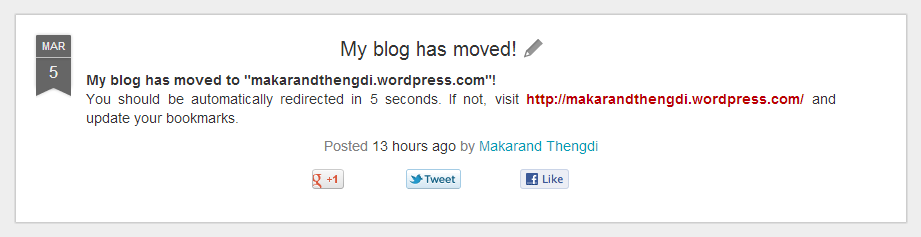
This is the output what you will see after doing as mentioned above:

P7

jQuery unable to get/set value of hidden input

ISSUE:

I had the following hidden input in some part of my page –

<input id="selectedOption" type="hidden" value="">

This hidden input was added to hold the ‘city name’, which was going to be populated in hidden input on some button click event.
For populating the value I wrote the following jQuery script:

$('#btnBloreCity').click(function(){
   // alert($('#btnBloreCity').attr('value'));
   $('#selectedOption').val($('#btnBloreCity').attr('value'));
});

The code seemed to be fine & was also executing without any error. But still value was not getting populated to “selectedOption” hidden input.
I re-verified the id of hidden input with the one used in the jQuery selector. But found it matching.

REASON:

After an hour of investigation, I found that one more hidden input field with same id was present before this hidden input. That’s the reason why on button click the value was not being populated to the hidden input.

jQuery Id Selector’s Behaviour:

When we use Id selector of jQuery $(‘#Id’) for finding element with specified Id & If two elements with same id are present in the DOM, then the selector returns you the first one.

Explaination:

(1) Add following two hidden inputs in your page inside body.

<input id="selectedOption" type="hidden" value="Mumbai">
<input id="selectedOption" type="hidden" value="Bangalore">

(2) Add following script within head tag of your page.

<script type="text/javascript">
   $(document).ready(function(){
      alert('Selected City: '+$('#selectedOption').val());
   });
</script>

(3) View Page in browser.

So when the page is loaded, an alert pops up saying ‘Selected City: Mumbai’

Hope you got the basic point…
Page should not have elements with duplicate IDs